Claude Usage Display
Overview
Claude Usage Display puts your Claude Code usage stats on a tiny round screen sitting on your desk. Instead of alt-tabbing to a terminal or menu bar widget, a single glance tells you how much of your session limit you’ve burned through and how long until it resets.
The project is inspired by TokenEater and ccusage, but takes the data off-screen entirely — onto dedicated hardware you can leave running all day.
Hardware
The build uses two Seeed components that snap together with no wiring:
- XIAO ESP32C3 — thumb-sized RISC-V board with WiFi + BLE, runs MicroPython
- Round Display for XIAO — 240×240 GC9A01 TFT, capacitive touch, RTC, and LiPo charging circuit
The display plugs directly onto the XIAO. No breadboard, no soldering, no jumper wires.
How It Works
Anthropic OAuth Usage API
         │
server/server.py  (your Mac)
reads Keychain credentials + JSONL logs
         │
    HTTP over local WiFi
         │
ESP32C3 + Round Display
polls every 10s, renders UI
A Python relay server runs on your Mac. It reads Claude Code’s OAuth credentials from the macOS Keychain and fetches real-time utilization data from Anthropic’s API — the same data that powers Claude Code’s built-in usage tracking. It supplements this with local JSONL log data for per-model cost and token breakdowns.
The ESP32C3 polls this server over WiFi every 10 seconds and renders the current screen.
UI Screens
Tap the left or right half of the touchscreen to cycle between four screens:
| Screen | Shows |
|---|---|
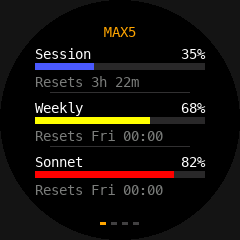
| Dashboard | Session, weekly, and Sonnet utilization bars with reset countdowns |
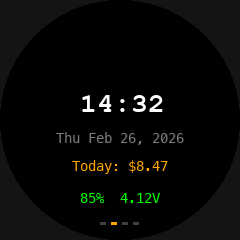
| Clock | Digital clock, date, daily cost, battery voltage |
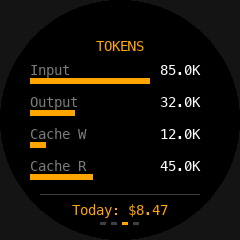
| Tokens | Bar chart of input / output / cache token usage |
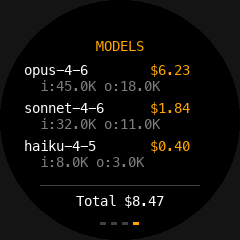
| Models | Per-model cost and token breakdown |
Color coding gives instant visual feedback: green below 50%, yellow from 50–80%, red above 80%.
Technical Highlights
- MicroPython firmware with the GC9A01 display driver baked in — no package manager, no dependencies to install on-device
- Relay architecture keeps the ESP32C3 simple: it only needs to parse a small JSON payload and draw to the screen
- Keychain integration on the server side — no API keys to copy, uses existing Claude Code credentials
- Battery operation — the Round Display’s LiPo charging circuit lets the whole thing run untethered; WiFi TX power is dialed back to 13 dBm to reduce peak current draw
- Touch navigation using the capacitive touch controller built into the display module
Setup
Flash MicroPython with the bundled display driver, configure WiFi credentials, start the Python relay server on your Mac, and reset the board. The shell scripts in tools/ handle flashing and file upload.
Status
Work in progress. Core screens are functional; the relay server handles both live API mode and a JSONL-only fallback when the OAuth endpoint isn’t reachable.
| Status: Active development | Platform: ESP32C3 + MicroPython | License: MIT |